
Project loading
When EQUINOX Core is opened, the project selected as active in EQUINOX Configurator will run in a dedicated tab.
All output messages resulting from the project’s execution will be shown in this tab, so reviewing them can be useful for troubleshooting.
First, all project definitions are read; then the devices defined are polled sequentially based on the definitions read.
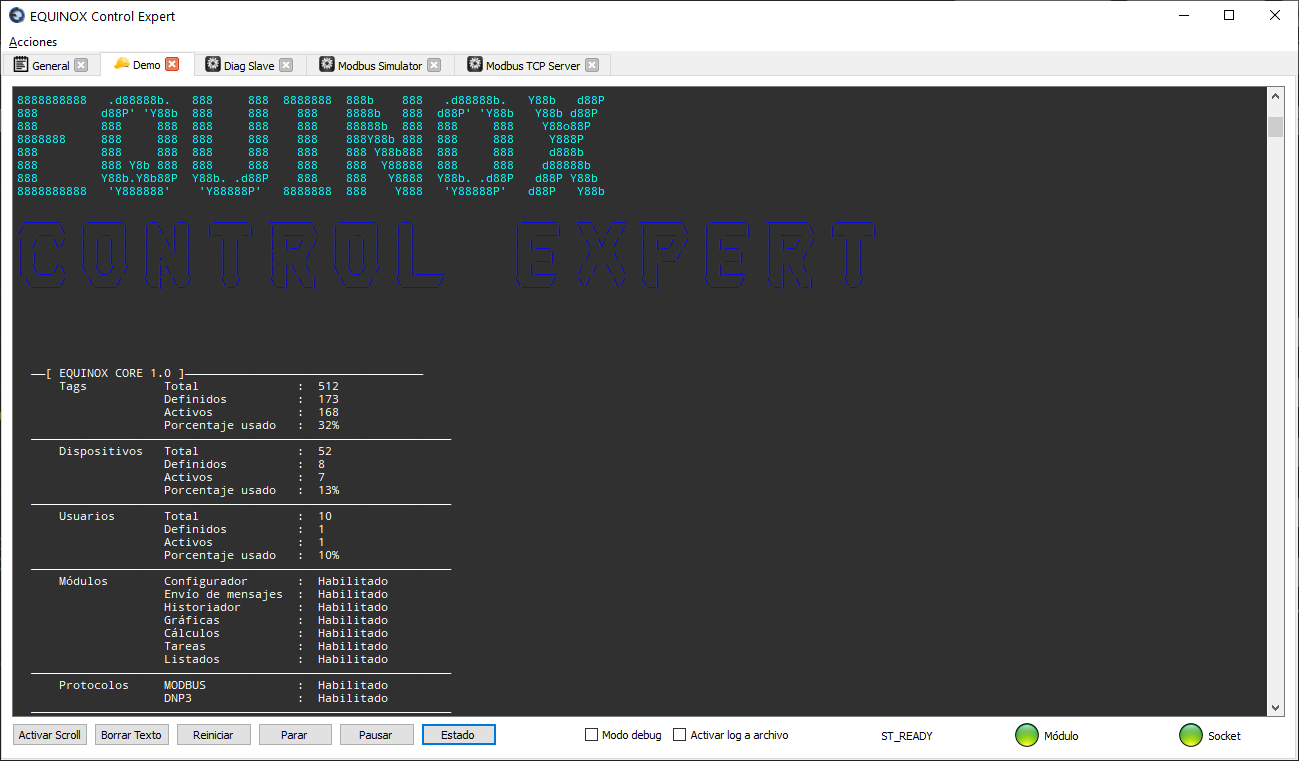
Reading definitions
At this stage the following definitions are read
- License features
- Element tree detailing Stations, Devices, Channels, Scan groups and the listing of Points belonging to each device
- Limit Sets
- Functions
License reading
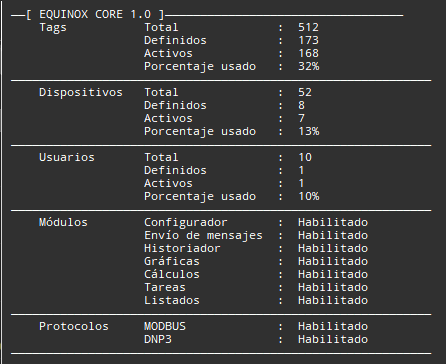
The quantities of tags (points), devices and users of our license are detailed, broken down as follows:
| Quantity | Description |
|---|---|
| Total | Indicates the total number of Points, Devices or Users available in the license |
| Defined | Indicates how many points, devices or users have been defined in the project |
| Active | Of the total Defined, indicates how many points, devices or users are active in the project |
| Percentage used | Percentage resulting from the ratio Active / Total |
It also indicates which modules are enabled in the license
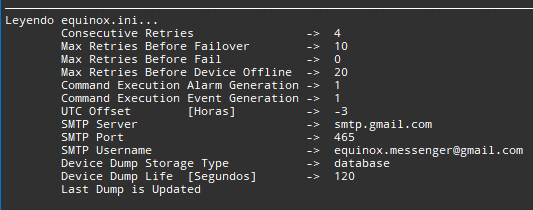
Reading the initialization file
Shows the main parameters read from the equinox.ini file located in the conf subfolder. This file can be edited manually or through the Settings action. For more information on the meaning of each setting, see that section.
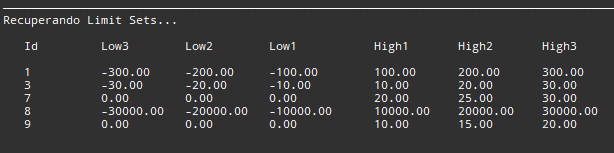
Reading Limit Sets
The three lower and three upper limits of the Limit Sets defined in the project are detailed.
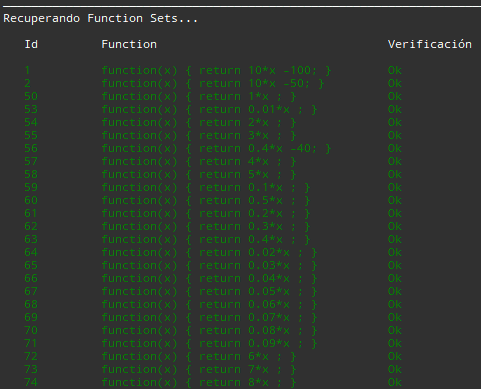
Reading Functions
The Functions defined in the project are detailed. The function’s JavaScript code is checked for errors; Ok is shown if no errors are found in the code.
Reading the Element tree
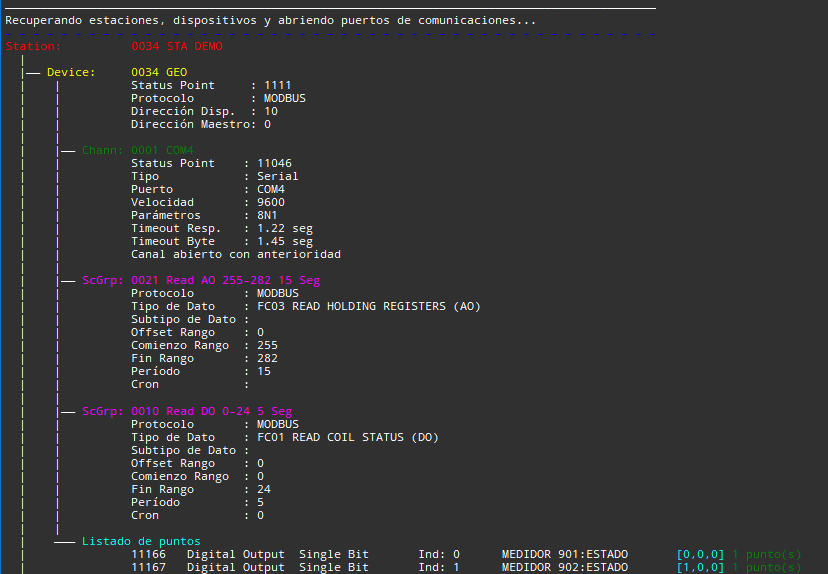
The Stations, their Devices, and the Channels and Scan groups associated with the latter are detailed.
The configuration of each element is specified; in the case of communication channels, one of the following messages is also shown:
| Message | Meaning |
|---|---|
| Channel opened successfully | The channel was opened and no errors occurred while doing so |
| Channel previously opened | The channel is assigned to several Devices; from the second Device onward this message is shown |
| Channel not available: [OPENING ERROR] | The channel could not be opened because it was busy with another program, not available in the operating system, or due to hardware or configuration errors |
| WARNING: There are no operational channels associated with this device | No channels have been assigned to this device, or channels were assigned but cannot be used due to errors |
Device point listing
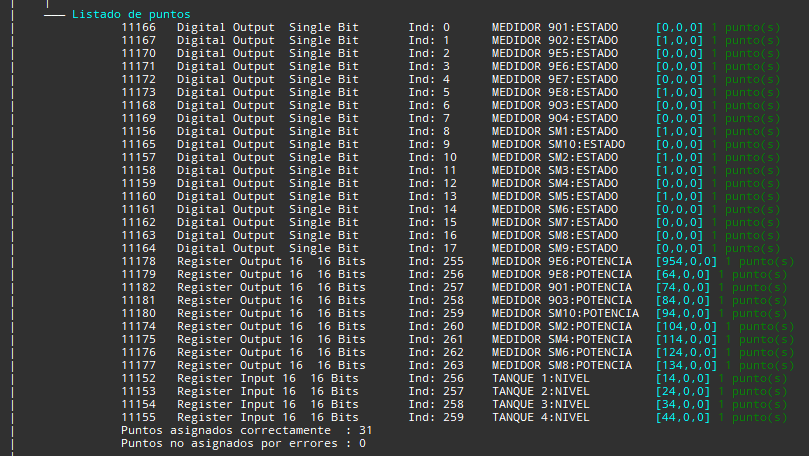
The Points of each Device are listed, detailing for each one its Id, Type, Subtype and Index (Ind), Name and Subname, and the number of points assigned to the same Index
If errors occur with the Limit Set or the Function, ERROR: Limit Set not found or ERROR: Function Set not found is shown. This may be because the Set or Function was deleted but its reference is still configured on the point.
At the end, the correctly assigned points and those with errors are totaled.
Dialogue with devices
All outgoing polling requests are shown on screen; the image below shows the different data represented

Type/Subtype codes for analog points
| Subtype | Effective length in bits | Description |
|---|---|---|
| 16By0 | 8 | 16-bit register, low byte (least significant byte) |
| 16By1 | 8 | 16-bit register, high byte (most significant byte) |
| 16Bit | 16 | 16-bit integer register |
| 16Wd0 | 32 | Two consecutive 16-bit registers, least significant 16 bits |
| 16Wd1 | 32 | Two consecutive 16-bit registers, most significant 16 bits |
| 32By0 | 32 | 32-bit register, byte No. 0 (least significant) |
| 32By1 | 32 | 32-bit register, byte No. 1 |
| 32By2 | 32 | 32-bit register, byte No. 2 |
| 32By3 | 32 | 32-bit register, byte No. 3 (most significant) |
| 32Wd0 | 32 | 32-bit register, least significant 16 bits |
| 32Wd1 | 32 | 32-bit register, most significant 16 bits |
| 32Bit | 32 | 32-bit integer register |
| MUL | Index assigned to more than one point | |
| *** | Unassigned index (unused) |
Type/Subtype codes for digital points
| Subtype | Effective length in bits | Description |
|---|---|---|
| SiBit | 1 | Single Bit |
| DuBtx | 2 | Dual Bit, where x is the bit number |
| TrBtx | 3 | Triple Bit, where x is the bit number |
| QuBtx | 4 | Quad Bit, where x is the bit number |
| PnBtx | 5 | Penta Bit, where x is the bit number |
| HxBtx | 6 | Hexa Bit, where x is the bit number |
| HpBtx | 7 | Hepta Bit, where x is the bit number |
| OcBtx | 8 | Octa Bit, where x is the bit number |
| MUL | Index assigned to more than one point | |
| *** | Unassigned index (unused) |
Tags
Point tags are labels that define the current condition of the point: not renewed, alarmed, command inhibited, etc. Each tag is represented by a specific letter.