
Communication Channels
This element defines the transmission medium between the SCADA system and the defined Devices. The medium can be copper cable, radio waves, fiber optics, etc.
Channels connect to the computer running the system either through serial ports (EIA/TIA RS232C or EIA RS485 type) or Ethernet ports.
The connection through Communication Channels follows a client/server model, in which the SCADA system sends requests or polls to a certain Device (specifying a hardware address to which the packet must be directed), and the Device then responds with the requested information.
Every information exchange is always initiated from the SCADA system side, never from the Devices’ side.
Each channel is assigned to one or more Devices. When a channel is shared, it is typically used in RS485 or Multidrop type configurations, where the Devices, since they share the transmission medium, must have different hardware addresses.
Screenshot
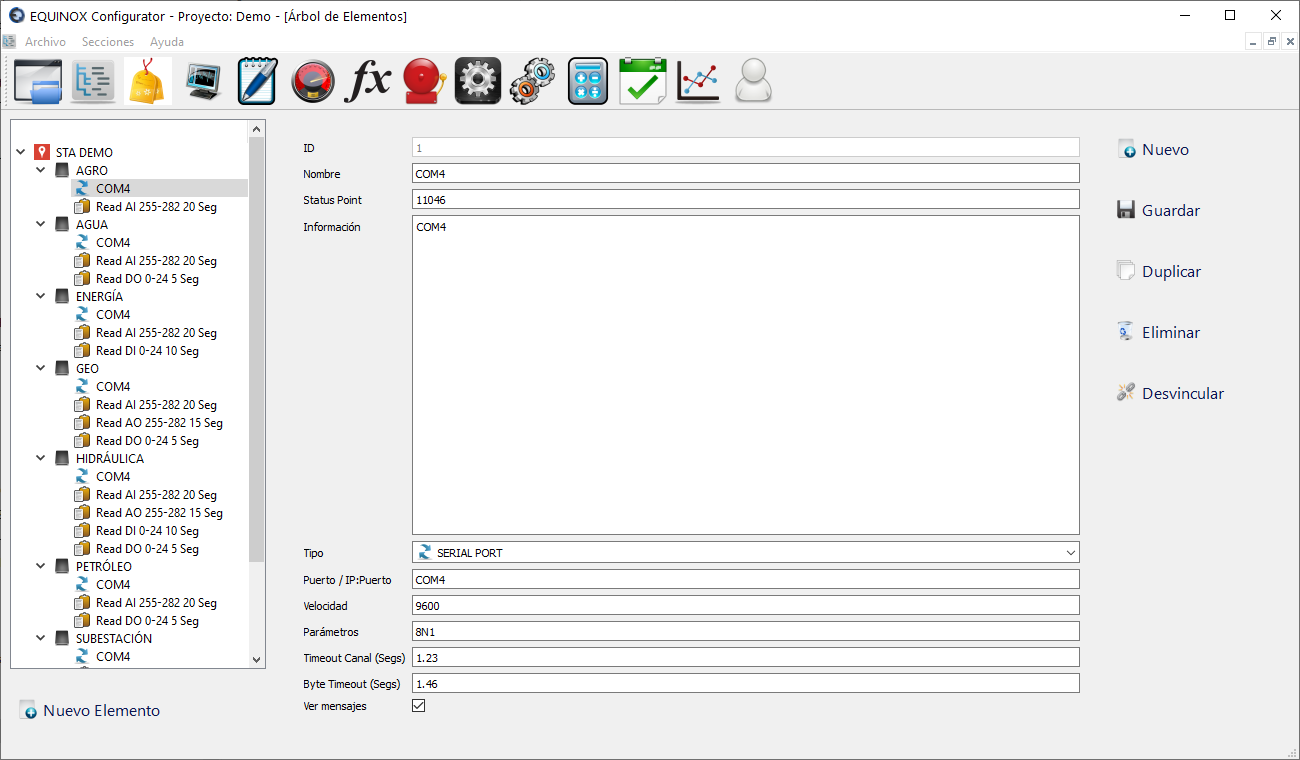
Definition
- Select another Communication Channel from the list and click the New button in the upper right area of the window
- If no Communication Channel has been defined yet, click New Element, select Communication Channel from the list and click Ok
- Fill in the following fields
Field Description Status Point Id Status point of the element (to indicate whether it is in service or out of service); optional. If not used, enter any number Information Field for user reference only Type Select SERIAL PORT if it is a serial port (COMx) or TCP/IP Socket for TCP/IP connections Channel Timeout Number of seconds that must elapse before a poll is considered unanswered Byte Timeout Maximum number of seconds between bytes of the response before it is declared invalid View messages Check if you want data exchanges related to this Channel to be shown in the Core module - Fill in the remaining fields according to the selected port Type, as detailed below
- Click Save
Definitions for the SERIAL PORT channel type
| Field | Description |
|---|---|
| Port | COM port to use, example COM1 |
| Speed | Speed in baud per second, example 9600 |
| Parameters | Data bits, parity, stop bits, example 8N1 |
Definitions for the TCP/IP Socket channel type
| Field | Description |
|---|---|
| IP Addr.:Port | Server listening IP address and port separated by “:” Example 192.168.121.34:502 |
Other buttons
| Button | Description |
|---|---|
| Duplicate | Creates a new Channel with the same settings |
| Delete | Deletes the Channel |
| Unlink | Allows unlinking the Channel from the Device it is linked to |