
Stations
The station is a concept that has no technical function, only an organizational one. It is an element that helps the system developer classify or group devices according to factors such as:
| Example | ||
|---|---|---|
| Geographic location | Physical position of the devices within an industrial plant | Production line 1, Communications room, Pump room, etc |
| Nature or type | The characteristic, model, or brand of the devices | Schneider PLC, Siemens RTU, ABB Multimeter, etc |
| Function | Task carried out by the devices | Pressure sensors, Temperature meters, Speed controllers, etc |
Screenshot
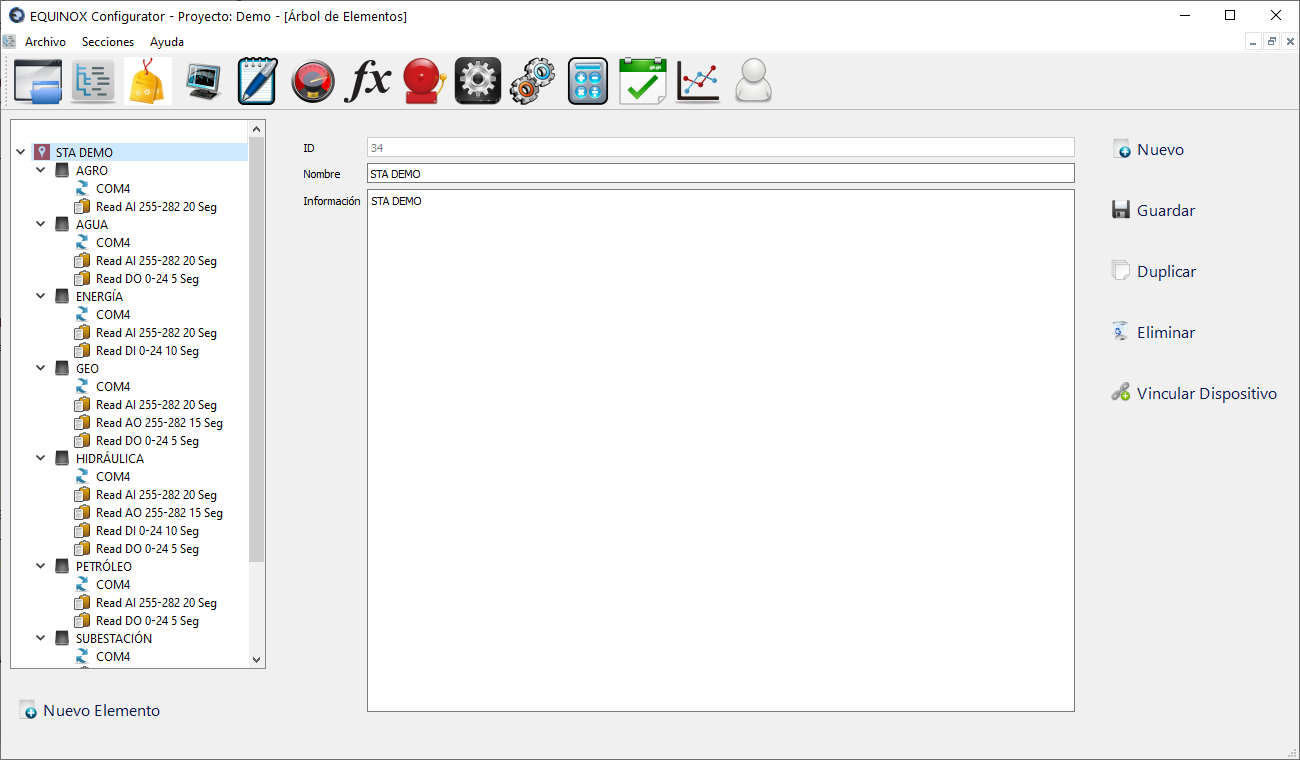
Definition
- Select another Station from the list and click the New button in the upper right area of the window
- If no Station has been defined yet, click New Element, select Station from the list and click Ok
- Fill in the following fields:
Field Description Name Name of the station Information Text for user reference, not used by the system - Click Save
Other buttons
| Button | Description |
|---|---|
| Duplicate | Creates a new Station with the same settings |
| Delete | Deletes the Station |
| Link Device | Allows linking Devices to this Station. A small window will open to select the device |