
Logs
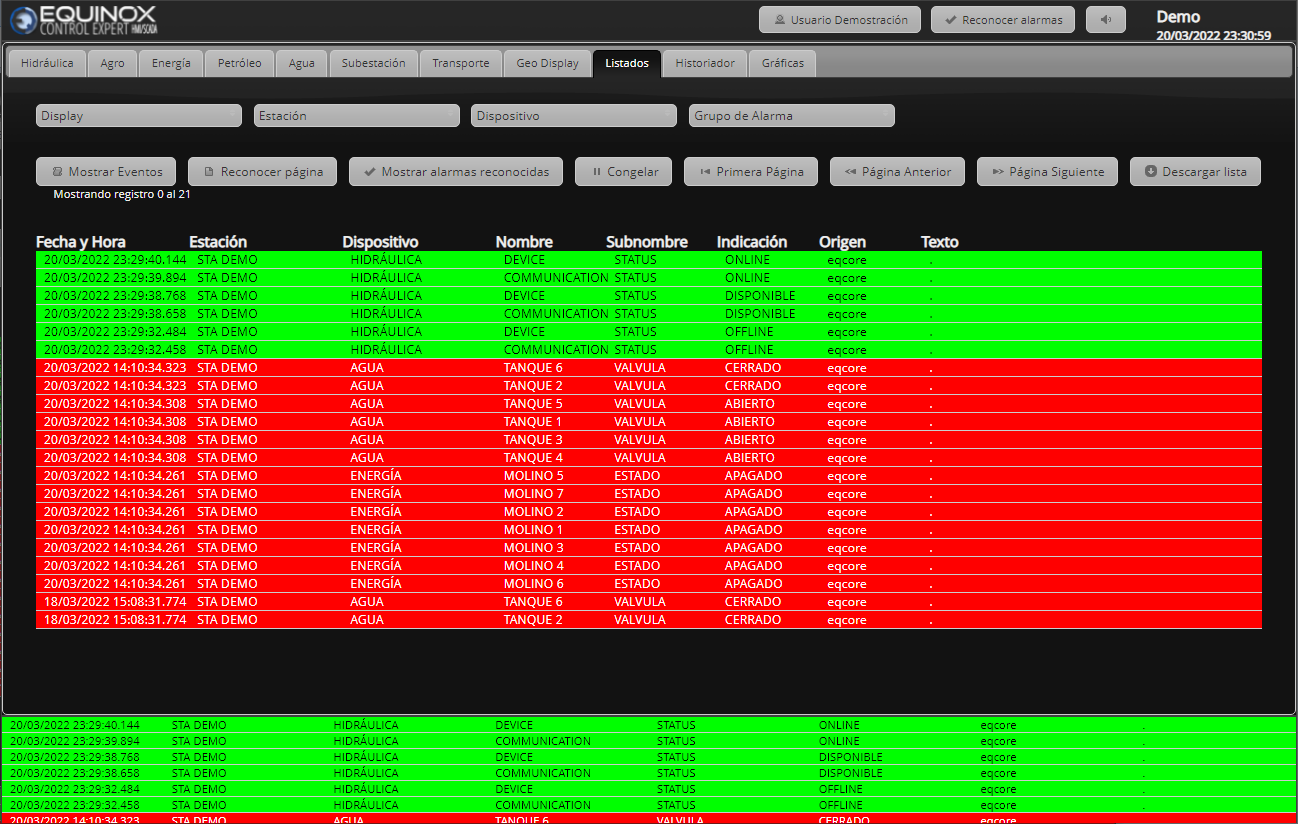
Allows consulting logs of alarms and events recorded by the system.
Alarms are anything that requires the user’s attention or intervention, including equipment state changes, limit violations, devices or communication Channels out of service, etc.
The event log contains the same entries as the alarm log, but also includes any other type of event related to the system’s operation, such as tag application, alarm acknowledgment, remote control execution, etc.
The logs are dynamic, meaning they are updated with the new events or alarms generated by the system.
Access and usage
Select the Logs tab, located after the ones corresponding to the user’s Displays.
It is possible to filter by display, Station, Device or Alarm group. It allows selecting events, unacknowledged alarms and acknowledged alarms. It allows paging and acknowledging the alarms on the page. The data can be downloaded, generating a CSV file (comma-separated values) for analysis in other programs, such as Microsoft Excel.
Filtering
It is possible to filter the results by Display, Station, Device or Alarm group, and combinations between them can be made. Click on the drop-down lists and select one or more elements.

Buttons
| Function | |
|---|---|
| Move forward or backward through pages in the log, or go to the first page |  |
| Toggle between the event log |   |
| Acknowledge alarms visible on screen (does not apply to events) |  |
| View acknowledged alarms (does not apply to events) |  |
| Freeze the log (no new alarms or events will be added until this button is pressed again) |  |
| Download all pages of the log according to the applied filters |  |