
Command Set
A Command Set is a group of telecommands that can be sent to a certain Device at the operator’s request.
They allow performing an action on the device, such as altering the value of a memory address or analog output, or changing the state of digital outputs.
These Sets are composed of Simple Commands and/or Sequential Complex Commands:
- Simple Commands allow changing the device’s digital outputs (setting an ON/OFF on a given coil)
- Sequential Complex Commands allow writing the value of one or more output registers, altering certain bits or writing fixed values or values taken from other points or registers
- It is possible to set up a sequence of Complex Commands, to be executed from a single operator order
Sets can be assigned to one or more points, so that clicking on the associated graphical symbol allows their execution.
They also use a Text Set to name each of the telecommands that make it up; for example, a Text Set containing START and STOP can be used and each text assigned to a certain Simple or Complex Command.
Screenshot
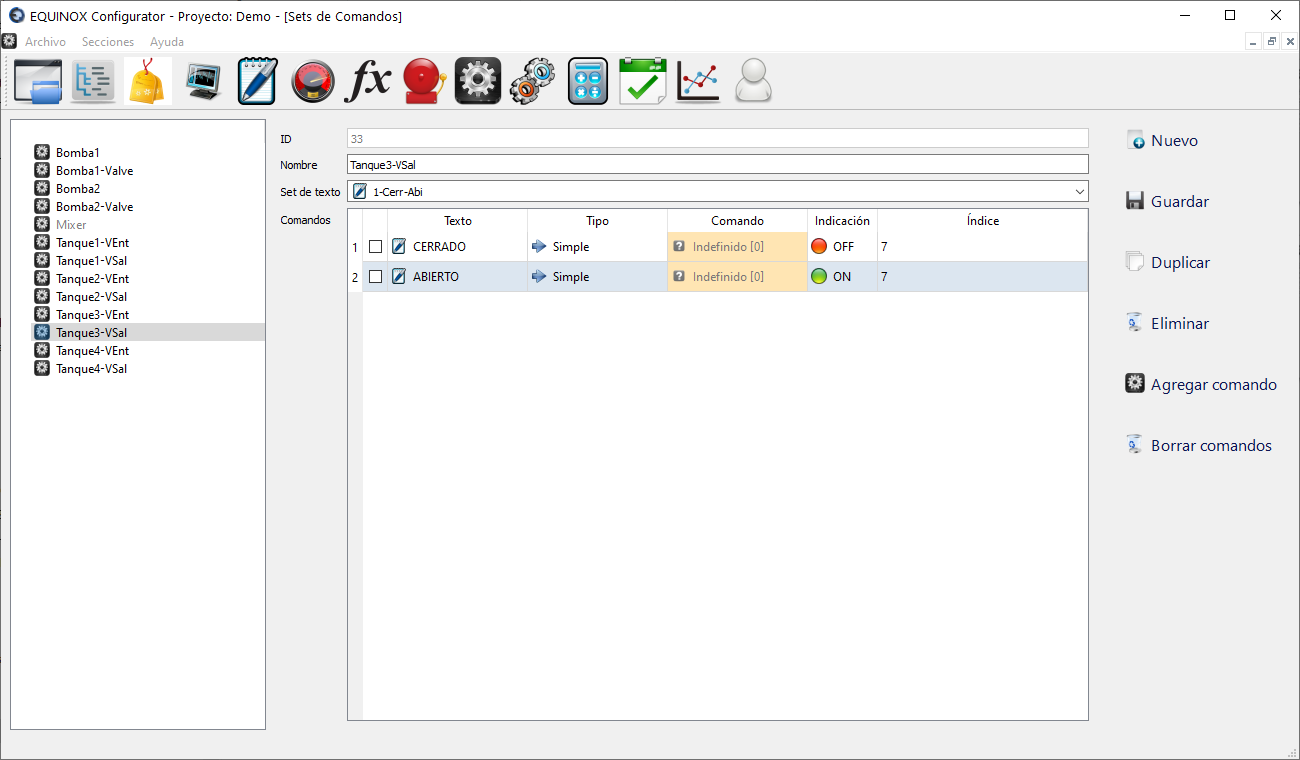
Definition
- Click New in the upper right area of the window
- Assign a name to the Set using the Name field. It will be shown under this name in the corresponding column of the Points section
- Select the Text Set to use with this Command Set.
- Click Save
- Select the Command Set you just created from the list
- Click Add Command. Each click adds a row to the commands table. You can add as many rows as there are items in the selected Text Set
- For each row added to the table:
- Double-click the Text column and choose one of the items from the Text Set that will identify this particular command
- Double-click the Type column and select Simple Command or Complex Command
- If you selected Simple Command, select OFF (to write a 0) or ON (to write a 1) in the Indication column, and in the Index column enter the address of the register on which you want to perform this action, not counting the base address, e.g. for 40.005 enter 5
- If you selected Complex Command, select one of the commands defined in the Sequential Complex Commands section from the Command column
- Click Save
- From now on the new Set will be available to be assigned in the Points section