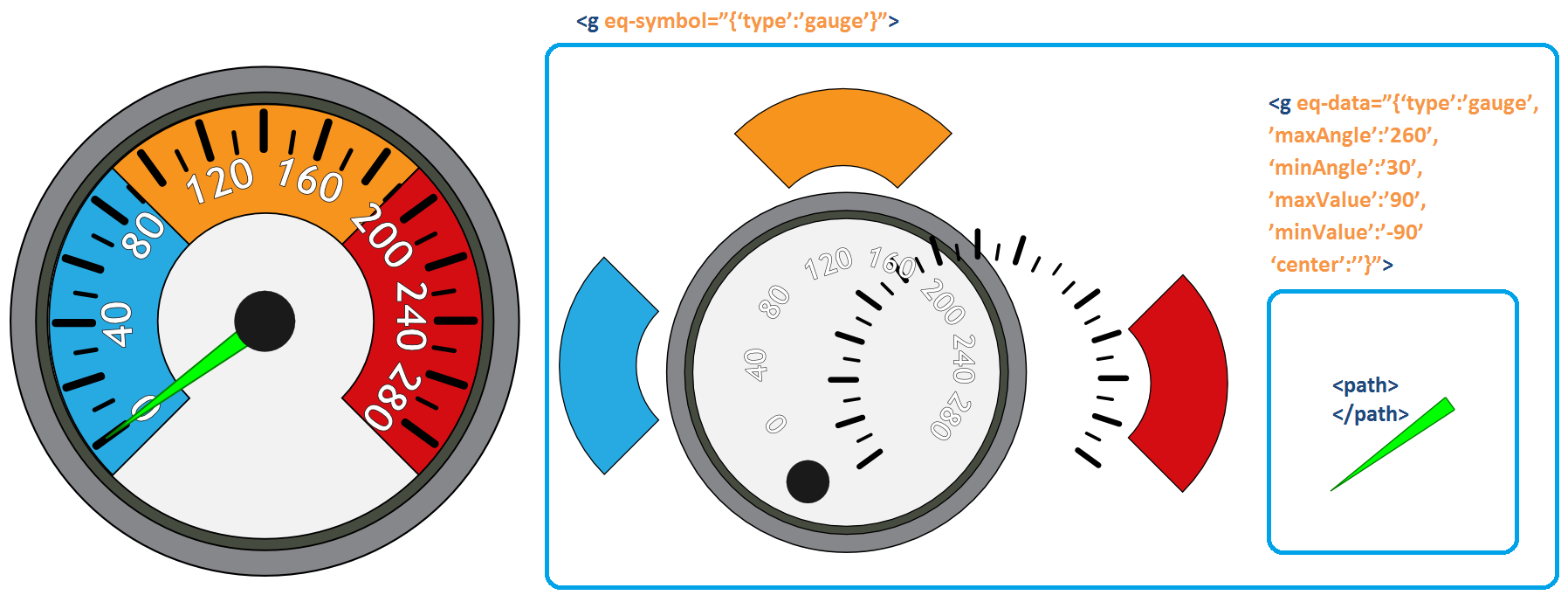
Gauge symbols
These are gauges whose needle takes on an angle according to the value held by the input or output register with which they are associated. This is a symbol used to represent analog-type values.
They allow the operator to see at a glance whether a series of parameters are within expected values. For example, the temperature of a furnace, the power of a transformer, the pressure in a pipe, etc.
Structure
The main group of the symbol’s SVG file contains an eq-symbol attribute whose value is gauge. Through this attribute, the system identifies all symbols of this type included in the Display.
Within this group we find the following:
- Group with the eq-data attribute: This group contains the graphic element that rotates in relation to variations in the register associated with the symbol. It must include a <path> element, which is the graphic representation of the gauge’s needle.
- Static content: Other graphic elements that do not change appearance in relation to the registers associated with the symbol. For example: the gauge frame, background color, scale, etc.
Parameters of the eq-data attribute
| Parameter | Description |
|---|---|
| type | Indicates the symbol type; matches what is specified in the parent group’s " eq-symbol" attribute under the “type” parameter. |
| maxAngle | This parameter determines the maximum angle that the gauge’s needle can take. If this parameter is omitted, a maximum angle of 360 degrees is used. |
| minAngle | This parameter determines the minimum angle that the gauge’s needle can take. If this parameter is omitted, a minimum angle of 0 degrees is used. |
| maxValue | This parameter defines the maximum value, in engineering units, that the register associated with the symbol should have. For example, if it is a pressure whose full-scale gauge reading should correspond to 300 psi, this value should be 300. If this parameter is omitted, it is treated as a percentage, with a default value of one hundred. |
| minValue | Similarly, this parameter defines the minimum value, in engineering units, that the register associated with the symbol should have. If this parameter is omitted, it is treated as a percentage, with a default value of zero. |
| center | Pair of [x,y] values in pixels around which the gauge’s needle - i.e., the graphic element within the group with the eq-data attribute - must rotate. |
When the system reads these parameters of the symbol, it takes the reading of the associated register and performs the following calculations:
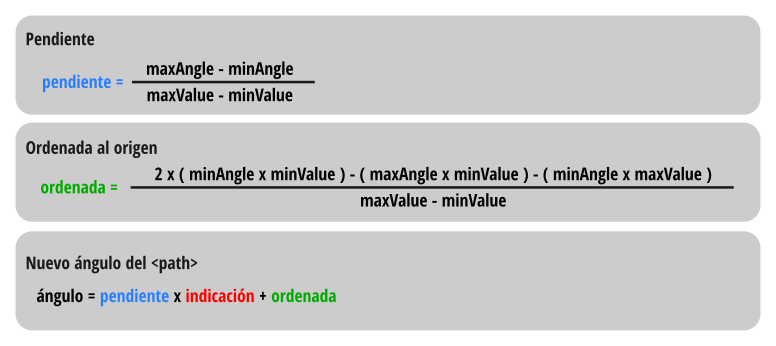
The calculated value is used in the transform attribute of the <path> graphic element, which represents the gauge’s needle, to indicate the angle it must rotate. In addition, the center parameter is used to define the point around which this rotation must take place.
Example: gauge with a 0 to 280 scale
All its elements are part of a group with the eq-symbol attribute. Some of them are static, such as those visible on the left of the diagram, and one is dynamic, such as the <path> that is part of the group with the eq-data attribute. In the latter, the maxValue, minValue, maxAngle, minAngle, and center parameters are defined. The <path> within the group with the eq-data attribute rotates around center by a certain angle as explained above.