Bar symbols
These are bars or rectangles whose height changes according to the value held by the input or output register with which they are associated. This is a symbol used to represent analog-type values.
They are useful for situations such as representing the fluid level in a tank, a thermometer, a progress bar, etc.
Structure
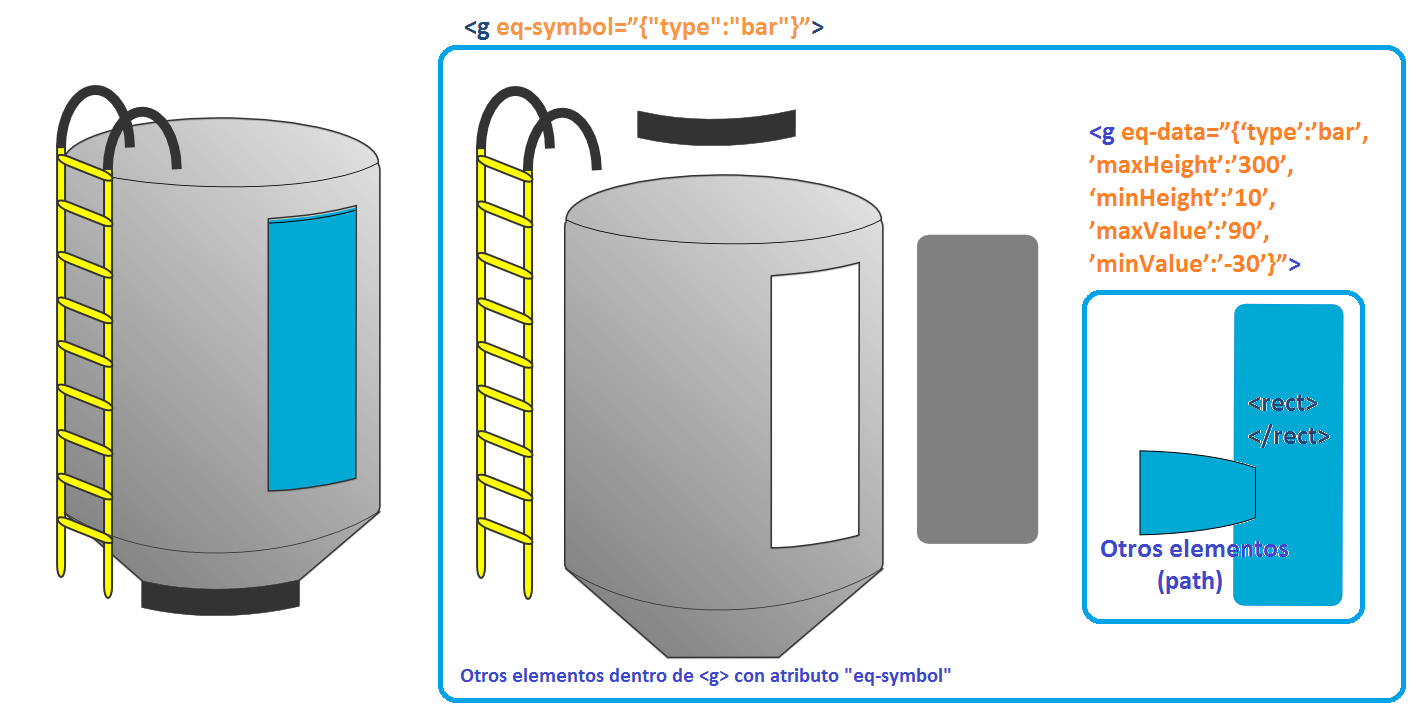
The main group of the symbol’s SVG file contains an eq-symbol attribute whose value is bar. Through this attribute, the system identifies all symbols of this type included in the display.
Within this group we find the following:
- Group with the eq-data attribute, containing the following elements
- <rect>: Its height changes according to the value of the associated register; the system uses the height attribute for this purpose
- Other elements: accessory elements that allow, for example, a three-dimensional appearance. Their vertical position changes to follow the height variations of the <rect>
- Static content: Other graphic elements that do not change appearance in relation to the register associated with the symbol. For example, in the case of a tank, this would be its structure, its supports, a side ladder, etc. That is, all elements other than its level.
Parameters of the eq-data attribute
| Parameter | Description |
|---|---|
| type | Indicates the symbol type; matches what is specified in the parent group’s " eq-symbol" attribute under the “type” parameter. |
| maxHeight | This parameter determines the maximum height in pixels that the rectangle can take. If this parameter is omitted, the static height of the <rect> is used as the maximum height, i.e. the height of the element before it starts being manipulated by the system. |
| minHeight | This parameter determines the minimum height in pixels that the <rect> can take. If this parameter is omitted, it is taken as zero. |
| maxValue | This parameter defines the maximum value, in engineering units, that the register associated with the symbol should have. For example, if this is a tank whose level can reach a maximum height of 10 meters, this value should be 10. If this parameter is omitted, it is treated as a percentage, with a default value of one hundred. |
| minValue | Similarly, this parameter defines the minimum value, in engineering units, that the register associated with the symbol should have. If this parameter is omitted, it is treated as a percentage, with a default value of zero. |
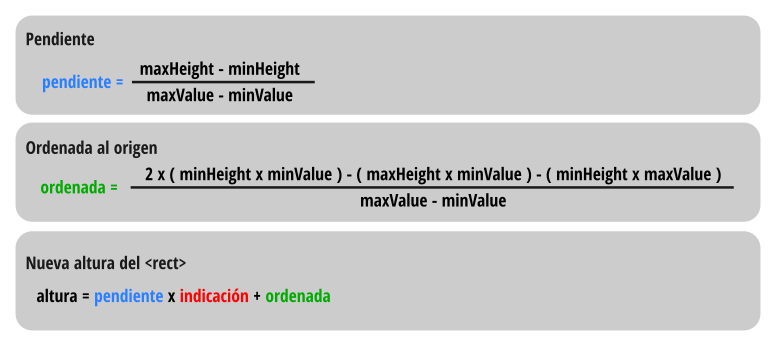
When the system reads these parameters of the symbol, it takes the reading of the associated register and performs the following calculations:
Example: three-dimensional tank
All its elements are part of a group with the eq-symbol attribute; some are static, such as those visible on the left of the image. Others are dynamic, such as the <rect> and the <path> that are part of the group with the eq-data attribute.
In the latter, the maxValue, minValue, maxHeight, and minHeight parameters are defined. The <rect> within the group with the eq-data attribute changes height as explained above, and the other elements accompanying it - in this case a <path> - change position to sit above the <rect>.