Status symbols
These are used to represent digital points from one to eight bits in length. The symbol is made up of a set of multiple graphics, one for each possible value of the point. Each graphic is shown on the Display when the point takes its assigned value. All other graphics remain hidden.
It also contains a similar set, likewise with one graphic for each possible value of the point, which is shown on screen in the event of a loss of communication with the Device, according to the last value read for the point at the time of the disconnection.
These symbols are useful for representing the state of elements such as pumps (on/off), valves (open/closed), switches (open/closed), disconnect switches, equipment status (online/offline), or any element that can take a finite number of states.
Structure
The main group of the symbol’s SVG file contains an eq-symbol attribute whose value is status. Through this attribute, the system identifies all symbols of this type included in the display.
Within this group we find the following:
- Groups with the eq-data attribute: These contain the valqual attribute with content value:quality. The first part is associated with the point’s value; for example, when the point takes the value 1 and communication with the Device is functioning correctly, the graphic with valqual 1:0 is shown. On the other hand, when communication with the Device is interrupted and the last value of the point was 1, the graphic with valqual 1:1 is shown instead. The rest of the graphics remain hidden.
- Static content: Other graphic elements that do not change appearance in relation to the registers associated with the symbol. For example: additional decoration, frames, background colors, etc.
Parameters of the “eq-data” attribute
| Parameter | Description |
|---|---|
| type | Indicates the symbol type; matches what is specified in the parent group’s eq-symbol attribute under the type parameter |
| valqual | Contains two numbers separated by “:”. The first corresponds to the value of the point. The second corresponds to the state of communication with the Device from which that point is read, being 0 for normal communication and 1 for failed communication. |
Example: pump
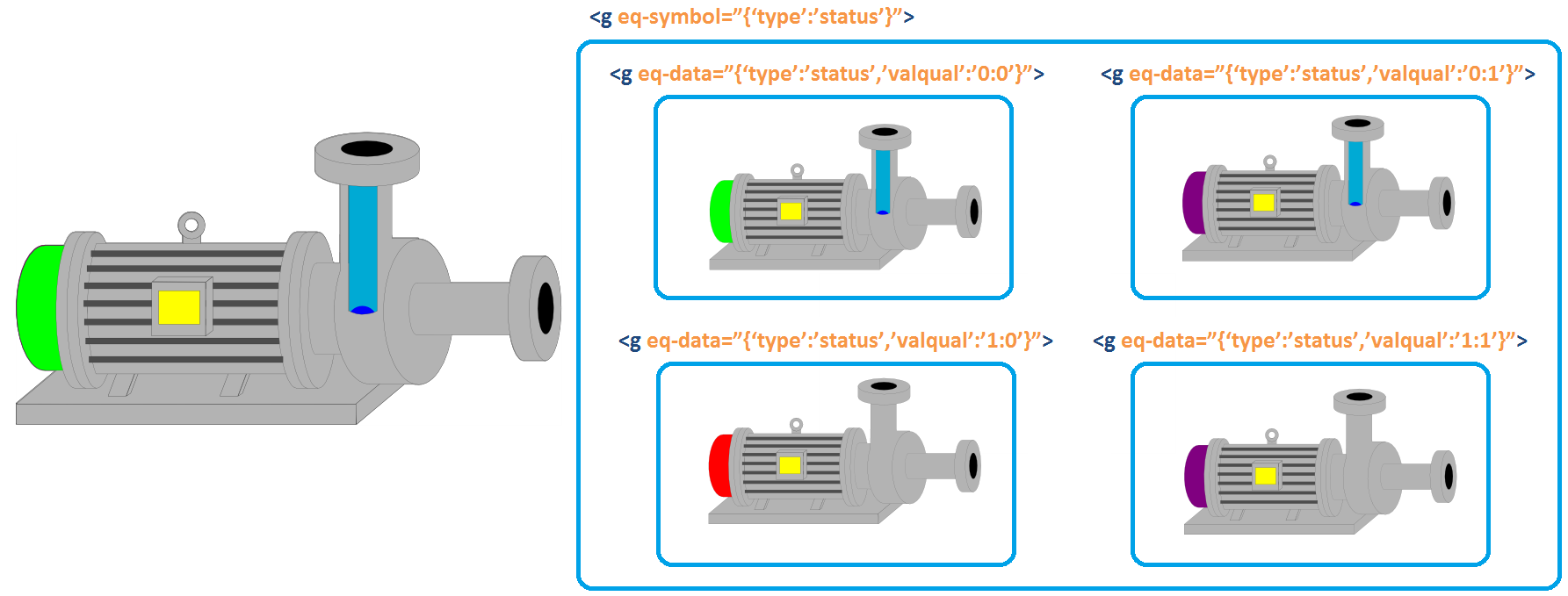
As can be seen, there are graphics of the pump, one for each possible value:quality combination. The four graphics are overlaid, and only one of them is shown at a time. The graphic shown is the one whose value:quality matches the current state. Each belongs to a group with the eq-data attribute, which in turn belongs to a parent group with the eq-symbol attribute.
For example, if the pump is on (point value 0) and communication with the Device from which the point is read is working correctly (quality 0), the graphic shown at the top left of the figure is displayed on screen. On the other hand, if communication with the Device is interrupted (quality 1) and the last value of the point was 1 (pump off), then the graphic shown at the bottom right of the figure is displayed.
Static content can be included, although this is not the case in this example, within the group with the eq-symbol attribute. This content is always visible regardless of the point’s state.