License
The license consists of a file named equinox.lic located in the conf subfolder within the system’s installation folder. It is uniquely tied to the computer where the system has been installed, or alternatively to a USB key (dongle) provided along with the license.
In the first case, EQUINOX can only be run on the computer for which the license was generated. On the other hand, when the license is tied to a USB key, the license can be moved from one computer to another along with the key, which must be connected to the computer where the system is to be used.
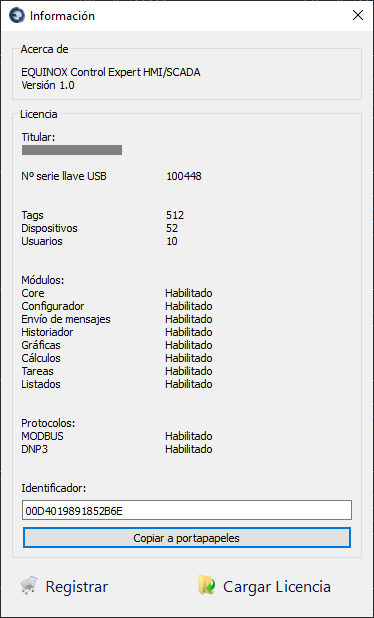
If you purchased a computer-based license, you will be asked for an identifier that you can find under Actions –> Information.
Installation
- Start EQUINOX Core
- Go to the Actions –> Information menu
- Click Load License and select the equinox.lic file
- Alternatively, you can manually copy the file into the conf subfolder
- If your license is tied to a USB key and you have not yet connected it to the computer, do so now
- Exit the system and restart it
- Go back to Actions –> Information and verify that the number of Tags, Devices, Users, and enabled modules match your license’s specifications